
Megan Roose
Megan is fan worm of science and was born just ahead of potential tech market startups. She is civil engineer by profession and got certified from university of California in 2004.
Google+


Megan Roose's Latest Posts
How to Share Live Video Streaming With Your iPhone?
iPhone users love different apps on their iPhones. They share pictures, news, data, pictures with friends and family. Social Media has become one of the major and famous things in today’s daily life. People like to share their pictures, memories, experiences through a wide range of media like videos, pictures, funny images, designs, wallpapers and other stuff on facebook, twitter, Pinterest and Google+. Koozoo iPhone app giving a new user experience to video sharing fans by providing the opportunity to share offline and live video sharing. This iPhone app enhances the value of their sharing by adding more value to the social media sharing.

Koozoo works as a network of smartphone video cameras with the mobile app which users can download and use free. This app makes world more closer to the people and turning whole real world into a virtual world through this amazing iPhone app. iPhone users will be experiencing this app through.
Koozoo iPhone app makes world connected with you and provides you the opportunity to share your live appearance with your friends. If you find out something interesting is happening, you can now share it with your friends.

Koozoo users will be using this app to share their real life experiences and funny moments. User has to download Koozoo iPhone app, and he can start sharing real time videos being shared by the friends from different places and even other parts of the world. It is something big certainly, to achieve the expected results from the designed idea and the product. It takes time to settle down after launching a unique idea and product.
 See Also: 5 Most helpful iPad Apps for Senior Citizens
Koozoo has two kinds of users. Koozo basic membership has the feature users to share videos from their smartphones and basic members can search new members through map-styled search interface to identify and search new users. Other membership type is Advance membership in which Advanced members share their favorite moments through live camera view. No worries, whether you are at office or home, it will be helpful fo you.
iPad Mini 2 or iPad 5: Rumors Start Hitting Minds
iPad mini has been one of the successful products of Apple and it was 5th edition of the iPad product. Now rumors have started drizzling in the tech-territories worldwide about iPad mini 2 or it may be named as iPad 5. Apple has been innovative with the iPad technology as its launch in 2010 revolutionized the tablet market.
 iPad mini was announced on October 23, 2012 and released on November 02, 2012. iPad mini was based on 7.9 inches multitouch LED display, 1 GHz dual-core ARM CPU, Operating system iOS 6.1, Wi-Fi and Bluetooth 4.0. Obviously users of Apple and iPad mini would be hoping to see more upgraded and high-tech iPad mini version. Either it comes under the name of iPad mini 2 or iPad 5, once thing is for sure, it might give tough competition to the tablet products in the market. Main competitors of Apple’s 2nd iPad mini would be Samsung, Asus, Google, HTC and other brands who are also offering tablet products in the competition of iPad mini.
See Also: iPad Mini Review with 5 Best Ultra-Features
iPad (1st generation), iPad 2, iPad (3rd generation), iPad (4th generation) and iPad Mini were the previous editions.
When iPad mini 2 can be released?
 According to different rumors and speculations iPad mini might be available to be ordered in April 2013 but not confirmed by any source. iPad mini can make a difference because there is no related tablet product is expected near the expected release of iPad mini. iPad mini might have challenges from competitors. Products like Samsung Nexus and Google Chromebook were main competitors for the iPad mini and we have to see, does any tablet product come to give competition to upcoming iPad mini edition which might be named as iPad mini 2nd.
iOS App Path Starts Private Messaging for Users
This is a famous iOS app named path starts for iPhone and iPad users which enhances its capability of social media interaction by adding private messaging feature in the recent update. Path users could see posts and updates from others and in order to communicate they have to comment on the others sharing and now they can send private messages to the people in contact. This update makes people able to send voice, media, location tag and stickers in private messaging.
 Path has been one of the demanding iOS app which has another additional feature of a shop in which you can buy designed stickers to send to the friends. Selling stickers would be able to make ‘Path’ to manage its monetization aspect and it would add strategic benefit by selling stickers. Finance and monetization is always necessary to run any organization or product.
Benefits of Path Starts Update
 Private messaging addition in the features of ‘Path’ would be amazing as users will be spending more time on using this app. When users use a product they refer to friends and family members. Many apps, softwares, online tools, social media sites and Smart phone OS utilities mostly get huge following by such type of peer-to-peer sharing and following. If your friend started using any app of iOS and you are also iOS user, then definitely he will show you the app to install it.
User Experience and Engagement
 It actually adds more value when communication gets private. People sometimes need to talk private things which they don’t want everyone to see in the circle. Facebook has this feature, if you have allow friends or others to send you private message, there will be an option available on the profile to send private message.
Now ‘Path’ provides you a great opportunity to grab the attention of your friends. Get your friends engage by sharing some great memories of the past or send your old times party pictures to them. It is All-in-one deal to get your closed-ones connected and keeping them abreast.
Fresh Gizmo of Apple’s FM Radio on iPod Nano
Apple designed MP 3 player iPod nano to work in iTunes applications of apple. It is used for many purposes to play music, videos and radio. More than you can make videos through it with having a drawback to not make pictures via iPod nano. It is very useful device to play radio on iPod nano with many other setting applications to arrange and to play the channels on it. It gives you knowledge about everything wherever you are; you can record or save songs that played on radio by choosing the option of recorder. This feature facilitates a person to spend his leisure hours with listening music, news, TV shows and many other programs.
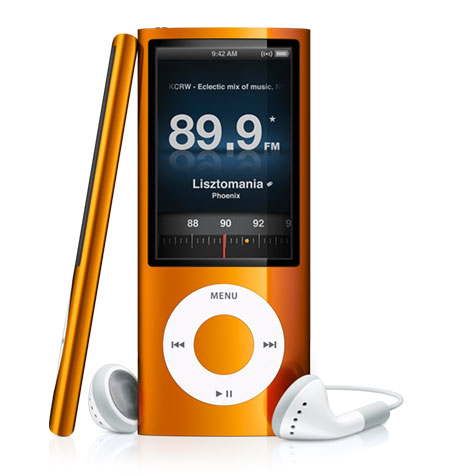 It is the best feature of iPod given by the apple’s developer and made this device jack of all traders. Radio on iPod nano plays lots of functions which discriminate this device to many other radio devices. It is easy to use and a most favorable feature for users through which, they get information regarding whole world and enhance their knowledge. You can also hear your favorite singers and DJs by tuning your favorite stations. You can control the radio functions through its touch screen system. The most convenient option for people is to tune radio while they are going somewhere or during walk to listen different programs at that time.
 FM radio on nano give opportunity to record live radio programs of your own choice and you can also mark your most preferable songs to purchase in future. But the marking option is present in iPod 5th, 6th and 7th Generations. All this become possible with its built in storage capacity. It has some other functions to use radio on this device that you can pauses the running program for 10 to 15 minutes to take a break and after that you can play the paused program which is the best one option of this device. Not only this, even you can record the precious informational programs to take help in your personal work. If you turn the channel during recording then you will lose the recorded material so don’t do that. If you want to switch off the channel then just do it by following proper way, first stop the recording or pause it then it will remain save.
See More: iPod Nano Shuffle Different Specifications
Radio on iPod nano provides FM tuner function to its user by which you can search different channels available in range of radio and can make a list of your favorite one station. All these functions will able to perform after connecting the headphones with it, in case of missing your nano iPod’s earphones you can use the other third party device’s headphones.
5 Best iPhone Racing Games For Adults
Having something entertaining on your iPhone is immensely important because it helps in removing boredom and tiresomeness.
Are you looking for the 5 best iPhone racing games?
Racing games always provide a wonderful source of pleasure. They are entirely based on true graphics and swiftness. Today, we have selected the top 5 racing games for your iPhone and you will be blown away by their dramatic attraction.
- Real Racing 3

The days have gone when everybody used to wait for the real racing 3 because the app is available for its enthusiasts. If you really wish to feel the difference between myriad car racing games, then never miss an opportunity to download this game on your iPhone.
It’s no less than a miracle from EA sports.
Get it Here.
- Death Rally

If you want to compete in different racing events, then Death rally is the most desirable game for your precious iPhone. Win races and challenge your loved ones to take you down.
From knockout races to standard races, everything is perfectly packed with classy amusement. After the hottest update, up to 6 opponents can take part in the race to compete against each other. This app is listed on number second in the listing of the 5 best iPhone racing games.
Download it Here.
- Forever Drive

In this game, players race against the timer. Combo meter must be increased to go faster because this is the only way to beat the time.
Forever drive is an ideal game for those who never compromise on speed. Try out real racing to enlighten your car driving experience. Remember, time is very costly and you need to keep up with clock needles.
Grab it Here.
- Sonic & Sega – All Stars Racing

This particular game has been perfectly optimized for race lovers. Driving through the hurdles and weird locations provide a matchless racing experience for everyone. Players are free to try new weapons and other tools to sabotage their rivals on the tracks.
Due to such interesting features, Sonic & Sega become more than just a racing game. Sega fans should not miss this high-tech mobile wonder.
Download it Here.
- Reckless Gateway

Need some change?
In the Reckless Gateway, you will have to avoid hurdles and cops by driving irresponsibly. Do not get anxious about the things lying on the roads because you are free to hit them away.
Driving your car in a Zigzagging pattern makes it more enjoyable for the players. So, we have decided to keep it at number 5 while making our collection of the 5 best iPhone racing games.
Download it Here.
Can You Jailbreak iPad Mini in Minutes with Evasion Tool
Jailbreak is a key to access your device to use advanced applications. It is the rule of apple manufacturers that they restrict their all devices at some extent and few advanced apps are not able to launch in devices except you personally purchase that. Here jailbreak is therule which enables you to use all restricted apps on your apple devices without paying or purchasing. To jailbreak iPad mini is not a big deal but once you do that you can able to download or install so many applications for use. It enhances the worth of your device to speeds it up to perform any task. You can easily download extensions, themes or wallpapers which are not possible with its original format.
Let’s talk about that how you can jailbreak iPad mini with minute-easy-dos:
IOS versions are used to jailbreak iPad mini and this procedure requires the latest version of IOS which is 6, although it is against the rules of corporation to jailbreak your device. Here steps are defined in order to jailbreak your mini iPad which makes it easy for you.
 You have to first upgrade your device from your older IOS version to its latest version 6.1 or 6.1.2. You can download 6.1 versions of IOS through online and can install it on your iPad to upgrade it.In case of already having this version you can start to jailbreak your device.
It is a healthy and sincere advice for people who wish to update or jailbreak their devices that first make a backup of your device and store data at any other place to keep your precious files safe for further use. iClouds also very popular for backup rationale. It will save you from many issues in case of losing your files from your iPad.
Remove any type of passwords or codes before doing so because these can make your way more complicated for you.Once you successfully upgrade your device then start to download the evasion version to jailbreak your iPad.
See Also: iPad Mini Review with 5 Best Features
 Make a folder on your PC and give it name “Pwnage” and save your download file of evasion into this folder.
 Extract this zip file here to see the original format to use. Click two times on to the icon folder to run this procedure.
 This will show you many other options from which you have to choose the run as administrator.
 Attach your iPad with PC setup to continue, this connection will possible with usage of a flash cable and you have to connect its one side into the PC and the other one into the device which makes connection between both.
 Reboot your device and it will be ready to jailbreak and tap the button of jailbreak and wait for few minutes. You will see the screen working this process and will restart after finished its work.After restart Cydia will run on your device’s spring board which means you successfully jailbreak iPad mini.
5 Best iPad Jailbreak Apps & Features
If you successfully jailbreak your ipad and explore cydia on your iPad then you can download best iPad jailbreak apps on it. These applications work fast and enhance the worth of your device. Cydia applications are only able to run on those devices that complete its jailbreak process, without which you cannot apply these apps. If you have iPad without jailbreak then first see the procedure to jailbreak it for using cydia applications on it. Many best applications for iPad are available on internet to download free for your device after jailbroken.
Some best iPad jailbreak apps are discussed below to give you information about the advantages of jailbreaking your device and what type of applications you can use after that.
SBS Setting
 SBS setting is one of the best applications of iPad where you can select the themes and tones of your choice and it is a quick access to toggles. You can delete the memory used in processing; also arrange the setting of memory along with another option to add toggles.
Activator App
 Activator is one of the best applications of cydia for iPad to set different gestures for different actions for example you can set the messaging opening folder with double clicking it. Whenever you double click it, it will open in front of you.Through cydia application of Full screen for iPad can use for multitasking purpose that you can select anyone of then by taping two time there on web page and it will show you at full screen and after completion your task just double click there and you will exit from the full screen option.
Infinifolders Storage Apps

Usually apple permits to save maximum twenty applications in folder whereas more than twenty can be save in one folder by applying the iPad’s application of Folder Enhancer and Infinifolders. Through which you can store many applications at one place just like the Window system. As you want to save songs then you have to make just one folder for it, in which you can make many others to store by giving sub categories.
IntelliScreenX App
 Through notification enhancement setting you can choose tone notifications for you on your iPad by using IntelliScreenX application, you can adjust your favorite tones for these notifications like facebook, twitter etc.
Customization
 Customization your iPad is another big opportunity given by cydia is that you can change your iPad’s setting according to your own wish that how you want to see your device. Icons, tool bars and themes are also changeable via this application.Applications icons can be larger or shrink by downloading this app on your iPad. When you have desire to see the background picture of your iPad then you should use this app and shrink the icon and you can easily view the picture behind these icons.
By applying these best iPad jailbreak apps you can enhance the value of your iPad and also you will enjoy working with these fast and useful applications.
9 Best Cydia Apps for iPhone
Jailbreak is a way by which you can use latest Cydiaprogramming system and can install many best cydia apps on your device from uploading its store. It makes possible for those devices that are free from rules developed by the apple administrations and the only way to break their rules is the jailbreak method which enables the idevices to download fast and some locked applications which normal formatted devices cannot upload.
Cydia Apps Nine Grinds
There are a lot best cydia apps are available to download for jailbroken devices like instantsnap, download and newsstand, torch app, status tab and so on. Here you will read some important apps of cydia like:
iSeries App
 For people who have interest in watching movies and other programs to enjoy at home or anywhere you are, iSeries application support you to search TV programs and movie links which you want to see and make its search easy for you in short time.
Status Tab
 Some users love to play video games on their iPhones or iPads via online or by downloading that it serve battery too fast then Status Tab help you to view the battery status on your display screen in shape of notification bar and you can set its options according to your need.
Animer App
 Moreover, you can change your notification setup by giving it animations and it will make more interesting and nice. This can only be possible by applying Animer app on your device to change the display of notification.
Torch App
 In the notification center, Torch app is the way to take you towards the dark side by tapping the screen.
Flag Point
 FlagPoint is one of the best application of cydia through which you change he colors of whole notifications like Gmail has a yellow color, twitter has a red color and facebook has blue color. All colors will be your own choice and also these are changeable.
Writeup App
 Another best and useful application of cydia is Writeup application that make it possible for user to write their story or to write their articles or whatever that want to write. It is especially useful when you have not your laptop and you want to do your written work so this application makes it easy for users to save their times and to release their tensions.
Music Box
 An interesting app of cydia is to allot ring tones to loved ones or friends and work members. By using the application of MusicBox you can differently allot the ring tones according to the status of relations.
BigU MoviesApp
 BigUMovies is a simple application to watch movies online and it gives opportunity to people to utilize their leisure time and they get enjoyed with this app.
News Stand App

Download to NewsStand is one of the best apps of cydia by which you can store the download pages for future use and can review these pages at any time without having problem of downloading.These best cydia apps are available at side to download and to utilize these on your devices.
Apple Inc. World’s Most Admired Company of 2013
 Fortune Magazine compiles a list every year after the research on the most admired companies of the world and the Apple World’s Most Admired Company at this time. The research based on the financial performance of the company, products made the the IT professionals and brand name collision among the consumers of electronic devices.
This is the 6th year in a row, as the Apple Inc. named as a the best admired company in 2013, in aver the well known brands including Google, IBM, Amazon and many other big names of the industry.
The major factor used in the poll survey done to many executives of the business concerning which organization they admire the most.
As focus on the Fortune’s website, the Apple’s negative response to vie value of its products, while observance a faithful customer support that carry a steady tributary of sales at the similar time, the company named as the most profitable company in the world in 2012.
Apple got the 1st position with the score of 8.24 out of 10 numbers after the survey, following Google on the 2nd spot with 8 points and Amazon.com which is the most famous shopping website go the 3rd position with 7.28 scores.
The last year, 2102 were remained very tough for Apple as they have to face a large number of Smartphone and Tablets in the market of their competitors, however, the iPhone 5 manage to get if worth a large number of people buy this unique device of Apple. Now the survey prove that people still like the products of this company as Apple World’s Most Admired Company of 2013.
Here is the list of top 10 Companies reasearch conducted by Fortune Magazine.

Macbook Pro Cases Hygienic Approaches
Some corporations are very popular for MacBook pro cases and people use their products to protect their devices from scratches and other dusty materials. It is very necessary to clean your laptop daily and to save it from damaging materials either your laptop has covered or not. There is no doubt that a cover helps you to keep clean your MacBook laptop and additionally it enhances the beauty of your laptop.

There are many types of cases for MacBook available in market or web and you can get a lovely one according to your necessity. Also these available in different colors and once you cover your device with case then your laptop will remain safe from many obstacles but it does not mean that now you are free to clean your device. Although it is a saver from dust for your device but you have to clean its case after passing time for which you have to be very careful.
Clean your MacBook Case:
It is not too sensitive process when you want to start to clean your MacBook Pro cases but you have to familiar with its safe way to be protective for your device. Here you will find good information regarding the cleaning process of your device’s case.
- At first you have to start from putting off the case from your device and first observe the condition of the case and get an idea in your mind that how you can put off this.
- Then pull the area from where it joins to the laptop.
- You can insert a visiting card or also your nails can be helpful to away the case from the surface of the MacBook. Hopefully this will be helpful to you and the case will over from the laptop.
- Then you need to have a clean fleece free cloth and pure water to start the process of cleaning.
- First clean the laptop overall by using fresh cloth and it should be fur free and remove the scratching areas from the laptop when you do this then go towards case.
- Remember! Before cleaning laptop remove its charger to protect you and your laptop.
- Clean the inner side of the laptop case and remove all dust from there then, use a dry cloth to dehydrate it.
- You can also make a mixture of vinegar with water and can spray on cloth to clean dirty areas but keep in mind that do not try to use directly.
- Then start dusting from outside of the MacBook pro cases after completing the dusting process then give it some time to dry and when it will then put its back on the laptop by following the instructions of its producers.


